Bot · Member identity
Recognize every member before they speak.
Luminox gives each registered member a compact Discord nickname adapted to the selected edition. Universal Edition uses the game name provided by the member; Community and Founder Editions verify and follow a Tibia main character.
One function · Two formats
The same clear identity, adapted to your community.
Both editions connect a Discord account to one recognizable game identity and append its account-wide Loyalty Level. The difference is how much game-specific information Luminox can verify.

Sacrel [RP394 L9] combines the verified Tibia main, vocation, level and Loyalty Level. Founder uses this same complete format.
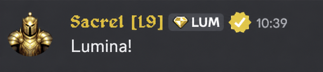
Sacrel [L9] keeps the member-provided game name and Loyalty Level readable without relying on one specific game API.
Choose the identity source
Simple when it should be. Verified when it can be.
The selected edition determines where the game identity comes from. The visible result remains compact, predictable and connected to the correct Discord account.
Universal Edition
One member-provided game name
The member enters the name they use in their game. Luminox stores it only for that Discord server and displays Game Name [L#].
Community / Founder
One verified Tibia main
The member verifies character ownership. Luminox displays Name [VOCLevel L#] and follows the selected main.
Automatic Loyalty suffix
The L value belongs to the Discord account. When a reward or reversal changes its Loyalty Level, the nickname refreshes automatically.
Server-safe uniqueness
Universal game names are unique inside that server. Community identities inherit uniqueness from verified Tibia ownership.
Panel-first changes
Members use guided buttons to set a game name, review their profile, choose a Tibia main where supported or remove the stored profile.
Honest permission handling
If Discord hierarchy blocks an edit, Luminox saves the profile and reports the exact suggested nickname instead of claiming success.
Member experience
Open the panel, set the identity, keep playing.
- 01Staff publishes one panel
The same setup command creates the edition-appropriate Registration or Member Profile panel.
- 02The member identifies themselves
Universal asks for a game name. Community and Founder verify a Tibia character and establish a main.
- 03Luminox applies the nickname
The bot uses the compact format supported by that edition and reports any Discord permission limit.
- 04Relevant changes stay current
Loyalty updates both formats; verified Tibia name, vocation, level and main changes update Community and Founder identities.
✓Discord accountOne owner
✓Game identityEdition-aware
✓Loyalty accountAutomatic level
→Discord nicknameOne clean line
Make identity visible
Choose the depth your community needs.
Start with a simple game-name profile in Universal Edition, or connect verified Tibia identity throughout Community or Founder Edition.